Make Words
- 4.3
- Rating
- 500.00K
- Installs
- Free
- Price
 Analysis by App-foxy
I found Make Words to be a pleasantly direct word game: it gives me letters, asks me to turn them into words, and lets the challenge come from my own vocabulary rather than from complicated controls or a busy interface. That simplicity is the main reason I would recommend it. It is easy to pick up for a short break, but it can also become a useful daily exercise when I want to think more carefully about spelling, word patterns, and less familiar vocabulary.
At the same time, this is not the right choice for everyone. Players who need a rich story, competitive multiplayer, animated presentation, or a large collection of different puzzle formats may find it too narrow. Make Words stays focused on unscrambling letters, and its appeal depends on whether that core activity remains satisfying for you after repeated sessions. In my experience, it works best as a compact vocabulary game rather than as an all-purpose mobile entertainment package.
Why the simple letter challenge works
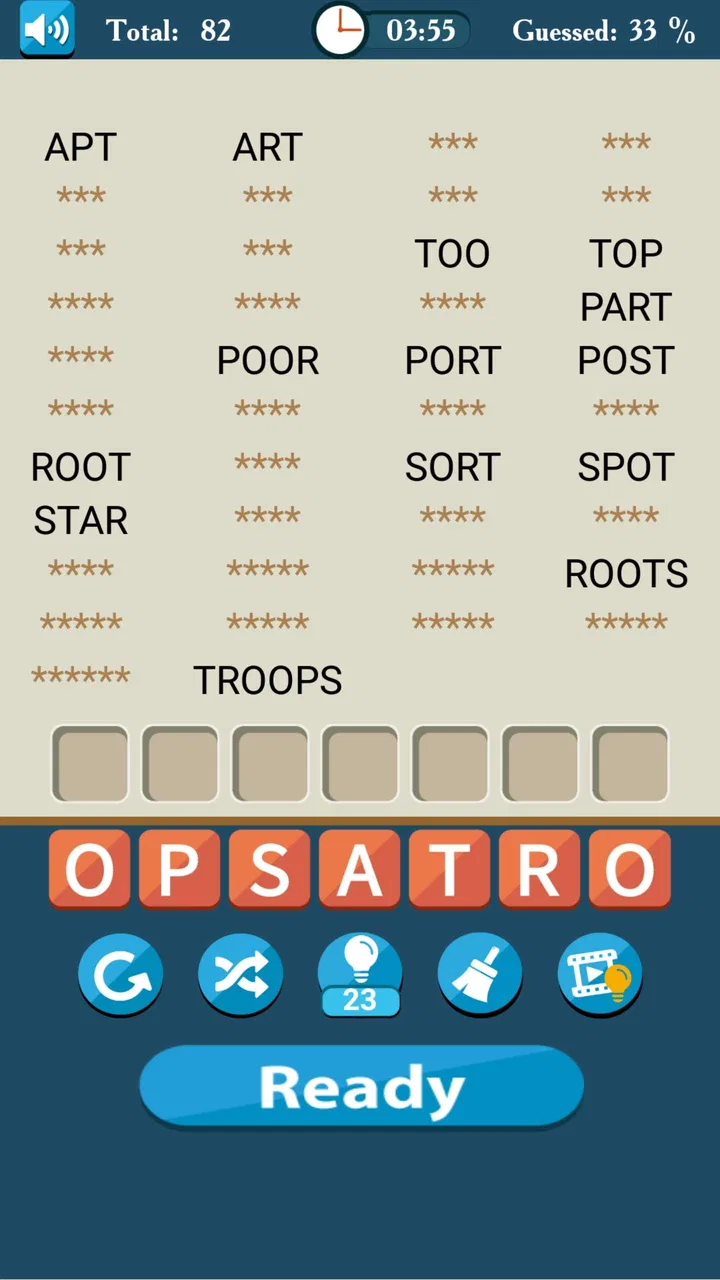
The game comes from Mobiloids and belongs firmly to the word-puzzle side of mobile gaming. Its central task is familiar, but the value is in how quickly it gets me playing. I do not need to learn a complicated control scheme or spend time understanding a fictional setting. I look at the available letters, test possible combinations, and try to recognize the words hidden in front of me.
You May Also Like

 Blood Strike: 2.5 Anniversary
Blood Strike’s Loadouts Turn Every Drop Into a Tactical Gamble
A close look at Blood Strike’s custom loadouts: how fast access to signature weapons reshapes its battle royale rhythm, rewards preparation, and narrows the gap between fights.

 Pandora - Music & Podcasts
Pandora’s Music Is Easy to Start, but Harder to Recover
Pandora’s strength is its low-effort path from a seed to a station. Its weak spot is how much confidence it asks you to place in connection, setup, and quiet recovery.

 8 Ball Pool
8 Ball Pool Is Built on Rivalries, Rematches, and Routine
A close look at the rivalries, rematches, shared routines, and unanswered safety questions that turn a quick pool match into a persistent mobile community.

 Samsung Music
Samsung Music’s Quiet Strength Is Playing What You Already Own
Its reach comes less from spectacle than from dependable access to a personal library. That simplicity is both the app’s strongest retention engine and its ceiling.

 AccuWeather: Weather Radar
AccuWeather Review: A Quick, Clear Forecast for Everyday Decisions
For everyday plans, the best forecast is the one you can understand quickly. AccuWeather makes rain timing, radar, and local conditions easy to act on, with a few trade-offs.

 Hill Climb Racing
Why Hill Climb Racing Still Turns Crashes Into One More Run
A tiny car, a bumpy hill and one more upgrade: Hill Climb Racing keeps resurfacing because its simple chaos makes every near-miss feel personal.
More From Our News Desk



That low barrier makes it suitable for small gaps in the day. I can imagine opening it while waiting for an appointment, taking a short break from work, or playing a few rounds before going to sleep. The format does not demand the sustained attention of a long strategy game, yet it still gives my brain something specific to solve. I have to scan letter groups, remember possible endings, and avoid settling for the first obvious answer.
The strongest part of the design is that the challenge comes from language itself. A puzzle may look easy because the letters seem familiar, but recognizing a valid arrangement is different from simply reading them. I often find that I know the individual letters immediately but need a few attempts to see the word. That small shift between recognition and recall gives the game more substance than its short description suggests.
It also makes the experience accessible to different kinds of players. Someone improving everyday English vocabulary can use it as a light practice tool, while an experienced word-game player can treat each round as a speed and pattern-recognition exercise. I would not call it a formal language course, but it can encourage curiosity about words and make me notice common prefixes, suffixes, and letter combinations.
A useful routine for short sessions
One of my preferred ways to use Make Words is in short, repeated sessions rather than one long sitting. I play until I notice that I am guessing carelessly, then stop and return later. This matters because word puzzles can become less enjoyable when I force myself to continue after my attention has dropped. The game is better as a small mental reset than as an obligation to complete a lengthy play period.
There is also a practical vocabulary habit hidden in the format. When I meet an unfamiliar word, I can pause and consider how its letters relate to words I already know. Even without turning every round into study, that moment of comparison makes the puzzles more memorable. Players who keep a note of words they repeatedly miss could turn casual play into a modest personal vocabulary exercise.
Another useful approach is to avoid immediately chasing the longest-looking answer. I first scan for familiar short structures, then use those discoveries to understand the remaining letters. This is more reliable than staring at the entire group at once. It also makes the game feel less dependent on sudden inspiration and more like a repeatable solving process.
Where it feels strongest compared with alternatives
Compared with crossword games, Make Words is more immediate. A crossword usually asks me to interpret clues, manage a grid, and connect several answers at once. Here, the letters are the main information I need. That makes this game a better fit when I want vocabulary play without reading a set of clues or maintaining a larger puzzle structure.
It differs from word-search games in another important way. Word searches reward visual scanning across a fixed arrangement, while this experience asks me to actively build or unscramble possibilities. I am not merely spotting a word that has already been placed in a grid. I am testing combinations in my head and deciding which ones make sense. For me, that creates a more involved mental task, even when the presentation remains simple.
Against large word-game platforms with daily competitions, social rankings, or multiple modes, Make Words feels more focused and less distracting. That is a strength if I want a quiet solo activity. It is a weakness if my motivation comes from comparing results with friends or constantly unlocking new systems. The game’s identity is built around the letter challenge, so it does not try to be a social hub.
I also see it as a better alternative to some heavily animated casual games when I want something that respects a short attention span. There is less to manage, and the puzzle itself remains the reason to stay. However, players who need visual variety may prefer a game with changing environments, characters, or several distinct mechanics. Make Words does not appear designed to compete on spectacle.
The limitations I noticed during play
The same narrow focus that makes the game approachable can eventually make it feel repetitive. Once I understand the basic rhythm of unscrambling letters, the experience depends heavily on the quality and variety of the puzzles I encounter. If I am looking for constant novelty, the central mechanic may not provide enough change on its own.
Difficulty can also feel personal rather than perfectly measured. A puzzle that is effortless for someone with a broad vocabulary may be frustrating for another player, even if both understand the rules. That is not necessarily a flaw in a word game, but it means the experience can swing between obvious and surprisingly stubborn. I would recommend treating missed answers as part of the learning process instead of judging progress only by speed.
The Teen content rating is worth keeping in mind for families choosing games for younger children. Parents should make their own decision about whether the vocabulary and overall presentation suit a particular child. For older children, students, and adults, the format is generally easy to understand, but the rating means I would not automatically present it as a children’s-only educational title.
There is also a financial consideration. The game is free to download, while optional in-app purchases range from $0.99 to $15.99 per item. I would begin without spending anything and see whether the basic experience is enough. That approach is especially sensible here because the main appeal is the puzzle loop itself; paying should only make sense if the available optional extras genuinely improve the way you want to play.
Players who dislike advertisements, interruptions, or any form of optional spending should check the experience for themselves before committing to it as a long-term game. I would not describe the free entry point as a reason to assume that every part of the experience will suit every player. The sensible expectation is that you can try the core game without paying, then decide whether the overall arrangement feels comfortable.
Who will get the most from it
I think Make Words is a particularly good match for people who enjoy language but do not always have time for a full crossword or a lengthy puzzle session. It suits commuters, students taking a mental break, adults who enjoy vocabulary challenges, and casual players who prefer thinking games over reflex-based action. It is also approachable for someone who has not played many mobile word games before.
It may be useful for learners who want extra contact with English words, provided they treat it as supplementary practice rather than a replacement for structured study. The game can help with recognition and spelling awareness, but it does not provide the wider context that comes from reading, listening, conversation, or formal lessons. I would use it to reinforce interest in words, not to measure language ability.
For experienced word-game fans, the appeal is more specific. You may enjoy trying to solve puzzles with fewer guesses, building a personal strategy, or challenging yourself to notice patterns faster. The game can become a small test of mental flexibility: when the obvious arrangement fails, I have to stop forcing it and look at the letters differently.
On the other hand, I would skip it if my priority were multiplayer competition, elaborate progression, or a strong narrative. It is also not ideal if I want every session to introduce a completely new type of challenge. A crossword app would be better for clue solving, a word-search game would be better for visual hunting, and a social word platform would be better for direct competition.
Practical ways to make the puzzles more rewarding
My first tip is to separate solving from guessing. Instead of entering every combination that comes to mind, I look for recognizable word structures and ask which letters could form a natural beginning or ending. This reduces random attempts and makes difficult rounds feel more logical. It is a small change, but it turns the game from a test of luck into a more deliberate vocabulary workout.
My second tip is to use mistakes as information. If a familiar-looking arrangement does not work, I do not simply repeat it with the same assumptions. I reconsider whether I am overlooking a different order, treating a letter as part of a common suffix, or focusing too strongly on a long word. This habit is valuable because the most stubborn puzzles often become easier once I change the way I group the letters.
My third tip is to match the session length to the purpose. For relaxation, a few puzzles are enough. For vocabulary practice, I would play more slowly and pay attention to words that feel unfamiliar. For a personal challenge, I would use a consistent routine and try to improve my solving process rather than becoming frustrated by one difficult round. The game supports all three approaches because it does not require a large time commitment.
I would also avoid comparing my progress too closely with another person’s. Word knowledge varies widely, and a player who reads a lot may have an advantage that has little to do with general puzzle skill. The more useful comparison is with my own previous habits: Do I recognize patterns sooner? Do I make fewer random guesses? Do unfamiliar words stay in my memory longer?
Device expectations and long-term appeal
The current version is 8.2_appod, and it requires Android 6.0 or later. That makes it relevant to people using older supported Android devices, although actual comfort will still depend on the phone’s condition and screen size. Since this is a letter-focused game rather than a visually demanding action title, I would expect the basic interaction to be more approachable on modest hardware than many modern games.
Its long-term value depends less on technical performance and more on whether you enjoy repeating the same kind of mental task. Some players can return to word puzzles for months because the satisfaction comes from solving; others need new mechanics to stay interested. I fall somewhere in the middle. I appreciate having a reliable letter game available, but I would not make it my only mobile game.
The game has been available since December 25, 2011, and its continued presence says something about the durability of this format. A straightforward word challenge does not become outdated as quickly as a game built around a short-lived trend. Still, longevity alone does not guarantee that every player will find enough variety. The important question is whether the basic act of forming words remains enjoyable for you.
Its audience size also suggests that it has reached well beyond a tiny niche: Make Words has over 500 thousand installs, with an average rating of 4.3 from around 13 thousand ratings. I see that as a useful sign of broad appeal, but not as a substitute for trying it personally. Word games are unusually dependent on individual vocabulary, patience, and preferred pace.
My final recommendation
After spending time with it, I see Make Words as a focused, accessible vocabulary game that succeeds because it does not overcomplicate its main idea. Mobiloids keeps the attention on letters, recognition, and the satisfaction of finding an answer. For a free game, that makes it easy to try, and the short-session format gives it a practical place in a busy day.
My recommendation is strongest for solo players who want a calm mental challenge, learners looking for informal word practice, and anyone who enjoys unscrambling puzzles more than managing a large game world. I would be more cautious about recommending it to players who need social features, dramatic presentation, or a constant stream of different mechanics.
The clearest reason to try Make Words is its focused balance between quick entertainment and vocabulary practice. Start with the free experience, play in short sessions, and judge it by whether the letter-solving process itself keeps you curious. If it does, this is an easy game to keep nearby for spare moments. If you need competition or variety above all else, a broader word-game alternative will probably serve you better.
FAQs for Make Words
01What is Make Words and how does the game work?
Make Words is a word puzzle game focused on creating valid words from a selection of letters. After starting a level, you arrange or connect the available letters to discover the correct answers. The game generally becomes more challenging as you progress, introducing longer words, less common vocabulary, and additional objectives that test both your spelling and vocabulary skills.
02Is Make Words suitable for beginners and children?
Make Words is accessible for beginners because the basic gameplay is easy to understand and the early puzzles usually provide a gentle introduction. However, difficulty can increase considerably in later stages. Parents should check the specific version’s age rating and advertising settings, especially if children will play, since vocabulary requirements and in-app purchasing options may vary between Android and iOS releases.
03Can Make Words be played without an internet connection?
Many word puzzle levels in Make Words can be played offline once the game has been installed, which makes it convenient for travel or areas with limited connectivity. Nevertheless, certain features may require an internet connection, including advertisements, cloud saving, updates, leaderboards, rewards, or purchases. It is best to launch the game online first and test offline access on your device.
04Does Make Words contain advertisements or in-app purchases?
Make Words may include advertising and optional in-app purchases, depending on the platform, version, and region. Ads can sometimes appear between levels or after using particular features, while purchases may offer hints, remove advertising, or provide additional resources. Review the store listing before downloading and use device purchase restrictions if children or other users can access the app.
05What should I do if Make Words does not save my progress or runs slowly?
If Make Words fails to save progress, first confirm that the application is updated and that your device has sufficient free storage. If the game supports account or cloud synchronization, sign in consistently on the same platform. For performance problems, close background apps and restart the device. Avoid uninstalling before confirming that progress is backed up, because local data may be lost.
Pros
- Simple interface makes it easy to start playing immediately.
- Short word challenges are ideal for quick breaks.
- Helps improve spelling and expand everyday vocabulary.
- Runs smoothly on most modern Android and iOS devices.
- Progressive difficulty keeps the game engaging over time.
Cons
- Some puzzles may feel repetitive after extended play.
- Hints can reduce the challenge for experienced word players.
- Later levels may become frustrating without a broad vocabulary.
- Ads may interrupt gameplay in the free version.
- Limited features may make the game less appealing to experts.

Make Words
Gallery